Product Design & Development
Digna
A telemedicine PWA for menopause care. 25 screens, 3 days, shipped to production.
Role
Product Designer & Developer
Timeline
2026
Team
Product Designer, Developer
Client
Klinika Digna
Duration
Three days end-to-end
Menopause is a years-long process, not a one-off appointment. Women managing it need ongoing, relationship-based care: not a rotating roster of GPs, not a generic telehealth platform, but a direct line to a specialist who knows their history. Klinika Digna is a Warsaw-based gynaecology practice specialising in menopause care, and they needed a digital product to match the quality of care they were already delivering in the clinic.
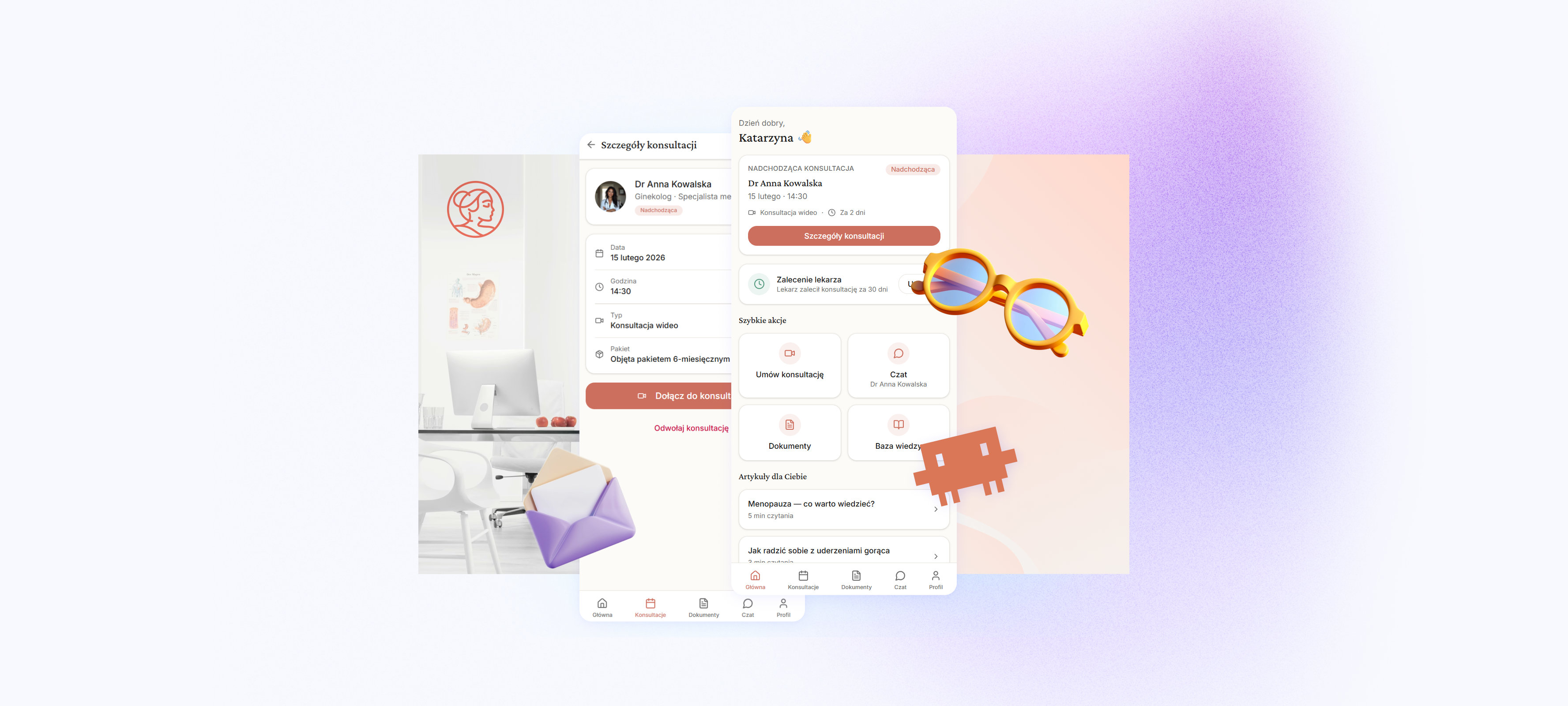
Digna is the patient-facing app we built for them: one place to manage the entire care relationship with their gynaecologist. The complete patient journey (booking, video consultation, documents, messaging, and a curated knowledge base) went from brief to production in three days.
My Role
I led this project end-to-end for Klinika Digna, covering the full scope: defining the information architecture, shaping the visual identity, building the design system, and designing all 25 screens. The project began with a discovery workshop alongside the owner of Klinika Digna, during which we mapped the patient journey, identified the core use cases, and aligned on priorities. From that workshop I produced a UX concept, a structured document covering information architecture, user flows, and key design decisions, which became the foundational brief handed to Claude Code for implementation. This was also an experiment in AI-assisted design and development, using Claude Code as a creative and technical partner throughout the build.
Understanding the User
The Patient: Marta is a busy professional in her late forties who has been seeing Dr. Anna Kowalska at Klinika Digna, a gynaecologist specialising in menopause, for two years. She wants to book follow-up consultations without calling a receptionist, check her prescriptions after a visit, and message the doctor between appointments when she has a quick question. She does everything from her phone and expects it to feel as polished as the apps she already uses. A confusing flow or a cold, clinical interface will lose her trust immediately.
Designing for Marta meant designing for confidence. Every screen needed to feel warm, clear, and respectful of her time.
The Context
Digna is the first online clinic in Poland focused exclusively on menopause care, recognised by Forbes Women as one of 25 femtech startups in Poland and featured in Charaktery magazine. That positioning matters: the menopause care market is highly specific and chronically underserved. Most women going through perimenopause or menopause encounter a fragmented system, a GP who treats each symptom in isolation, referrals across multiple specialists, and no continuity between appointments. Digna was built to replace that fragmentation with a single, continuous care relationship. The clinic's interdisciplinary team covers gynaecology, psychology, dietetics, dermatology, and internal medicine, all accessible within one subscription. Symptoms like hot flashes, night sweats, sleep disruption, mood changes, and hormonal shifts require coordinated management, not episodic appointments, and the whole product model reflects that.
Voice and tone. Digna's brand is warm, direct, and deeply personal. The headline on their site reads "Jesteśmy tu, aby zaopiekować się Tobą na każdym etapie menopauzy" ("We're here to take care of you at every stage of menopause"). It speaks to the patient in the second person singular, informal, close. Never clinical, never bureaucratic. The copy throughout is supportive and expert at the same time, the kind of tone that makes a patient feel both cared for and in good hands. That voice was the reference point for every interaction and label in the app: the onboarding copy, the booking confirmations, the chat interface, even the empty states.
The end user. The patients using this app are women noticing the first signs of perimenopause or already navigating menopause: irregular cycles, hot flashes, sleep problems, mood swings, joint pain. Many arrive having already seen a GP who treated individual symptoms without addressing the hormonal root cause. They are looking for a specialist who knows their full history, a direct line when questions come up between appointments, and a way to manage their care without phone queues or waiting rooms. They expect the app to feel as polished as any consumer product they already use.
The product brief added a few hard constraints on top of all of this: mobile-first, Polish language throughout with correct medical terminology, video consultations only, and a subscription model where consultations are drawn from a package. These weren't limitations; they were guardrails that kept the scope honest and the experience focused.
Discovery and Main Application Flow
Before any screen was designed, I benchmarked how comparable apps solve the same structural problems. I looked at Doctolib for its appointment booking model and how it balances density with clarity; Flo for how a women's health product organises ongoing health data and surfaces education without overwhelming the user; Ada Health for its patient-first information architecture; and Teladoc for how a telemedicine product handles the relationship between scheduling, consultation, and follow-up. Across all four, health apps that earn trust put the most important action and the most relevant context front and centre, without making the user hunt.
That analysis shaped the home screen directly. Marta's most pressing question every time she opens the app is "what's coming up?" That's why the upcoming consultation card anchors the top of the dashboard. Below it, curated articles and recommendations from her doctor serve a dual purpose: they extend the relationship between visits, and they position Klinika Digna as a knowledgeable guide, not just a booking tool. Getting this right on the home screen means Marta has a reason to open the app even when she doesn't have an appointment scheduled.
Bottom navigation, not a hamburger. The hamburger menu hides navigation by definition. Every feature behind it is a feature users have to actively discover, and navigation hidden behind a menu tends to see far less engagement than items surfaced in a persistent bar. For an app where the five primary destinations (Home, Appointments, Documents, Chat, and Profile) need to feel equally accessible, a bottom tab bar is the correct call. It sits in the thumb zone on every phone, it's always visible, and it removes the cognitive overhead of "where is the thing I want?" entirely. Elevating Documents to the main navigation means a patient checking a prescription after a visit reaches it in one tap, always. Giving Chat equal weight signals that asynchronous messaging is a first-class channel, not an afterthought.
The same app on every device. Because Digna is built as a Progressive Web App, it runs in the browser on phones, tablets, and desktops without a separate codebase. The layout adapts: card widths, spacing, and content density respond to the available viewport, but the interaction model doesn't. The same bottom navigation, the same tap targets, the same information hierarchy whether Marta is on her phone in the waiting room or her laptop at home. Consistency here matters because trust in a health product comes partly from predictability: the app behaves the way you expect it to, every time, on every device.
The Booking Flow
The booking flow was designed to minimise the distance between decision and confirmation. From a UX standpoint, the two-step structure (pick a date, then review and confirm) maps directly to the two mental steps a user goes through: "when do I want to go?" followed by "is everything correct before I commit?" Collapsing these into fewer steps risks users missing important details; adding more steps introduces unnecessary friction for what is, ultimately, a simple action. An earlier version asked users to choose between video and audio formats before reaching the calendar, a third step with a decision that had no real answer, since all consultations are video anyway. Cutting it reduced friction without removing anything of value.
The calendar view presents availability in a format users already understand from every other booking system they've used, a mental model that requires no instruction. Unavailable dates are visually suppressed rather than removed, giving the user a sense of the full picture without confusion. Data at each step is presented in progressive order of specificity: first the date and time slot (the primary decision), then on the confirmation screen the full context: doctor name, format, duration, and the subscription credit being used. This layering reflects how users actually think: choose first, verify second.
The end screen offers multiple forward paths by design. After a booking is confirmed, a user's next intent could be any of several things: return to the home screen to see the appointment in context, go to the appointment list, add the date to their calendar, or start a conversation with the doctor ahead of the visit. Presenting only one option, a single "Done" button, forces an extra navigation step to get wherever the user actually wants to go next. Offering the most likely next actions directly on the confirmation screen follows a core UX principle: reduce the number of steps to the next meaningful action, and let the user choose their own path forward rather than funnelling them to an arbitrary destination. Both steps also give users two ways out: a back arrow that goes one step back, and an × button that returns directly to Appointments, because someone who opens the booking flow by accident needs a graceful exit, not a trap.
Visual Design
The Digna website sets a clear visual brief: warm terracotta as the brand colour, cream-white backgrounds rather than clinical white, circular crops for doctor portraits, and patient photography showing active, confident women in natural settings rather than sterile stock imagery. It reads as a premium consumer product, not a medical portal. The app was built to carry that identity directly into a digital-native context. Digna's full visual reference material was provided to the AI model at the start of the build, so colour decisions, photography treatment, and layout approach all translated from the website into the product without loss.
Typography and component language. Two typefaces carry the entire app: a refined serif for headings that signals expertise, and Inter for all UI text and body copy. Cards use a generous border radius that leans into consumer-app softness; interactive elements signal their state through subtle shifts: a quiet colour change, a status badge that confirms at a glance. These decisions were realised through a component library that the AI model assembled and adapted from Digna's existing design system, extending it to cover all 25 screens rather than generating components from scratch.
Designing with AI
This project was built using Claude Code as an AI pair programmer, a way of working where I defined intent, reviewed output, and directed iteration from the product and design level rather than writing every line of code manually.
What made it work was having the design language fully resolved before any screen was built. Every colour, radius, spacing value, and type decision was documented as a design token before implementation began. That gave the AI a shared vocabulary to work from, and it meant design decisions travelled without loss from concept to component.
The process had four natural phases: establishing the foundations and core components; building all 25 screens in flow order; systematic refinement once the app was running in the browser; and a final polish pass focused on perceived quality, refining spacing, and tightening the small details that separate a good prototype from a great one.
Vibe coding moves fast precisely because the first pass is expected to be imperfect. The iteration cycle is what matters, and having everything documented meant each cycle was productive rather than exploratory.
The Outcome
25 screens covering the complete patient journey: login, onboarding, booking, pre-call check, video consultation, post-visit feedback, document vault, chat, knowledge base, and profile management. Designed and shipped to production in three days.
What I learned. Resolving the design system before touching a single screen was the most important decision I made. When the visual language is settled upstream, every downstream decision is faster, more consistent, and easier to hand off, whether to a developer, an AI, or your future self six months later.
What's next. Backend integration, real video via a WebRTC provider, push notifications for appointment reminders and new messages, and downloadable PDF prescriptions. The foundations are there.
The full app is live. Book a consultation, browse the document vault, send a message, walk through the video call flow. No login required to explore.
It's A Real Thing. Go Ahead And Open It.